Implementing Microsoft Dynamics 365 Business Central is not simply a system deployment—it is a structured business transformation initiative. To reduce implementation risk and ensure successful outcomes, Microsoft recommends an outcome-driven methodology known as Success by Design¹.
Success by Design structures the implementation lifecycle into four key pillars—Initiate, Implement, Prepare, and Operate—ensuring that business objectives, people, processes, and technology remain aligned from planning through post-go-live operations¹.
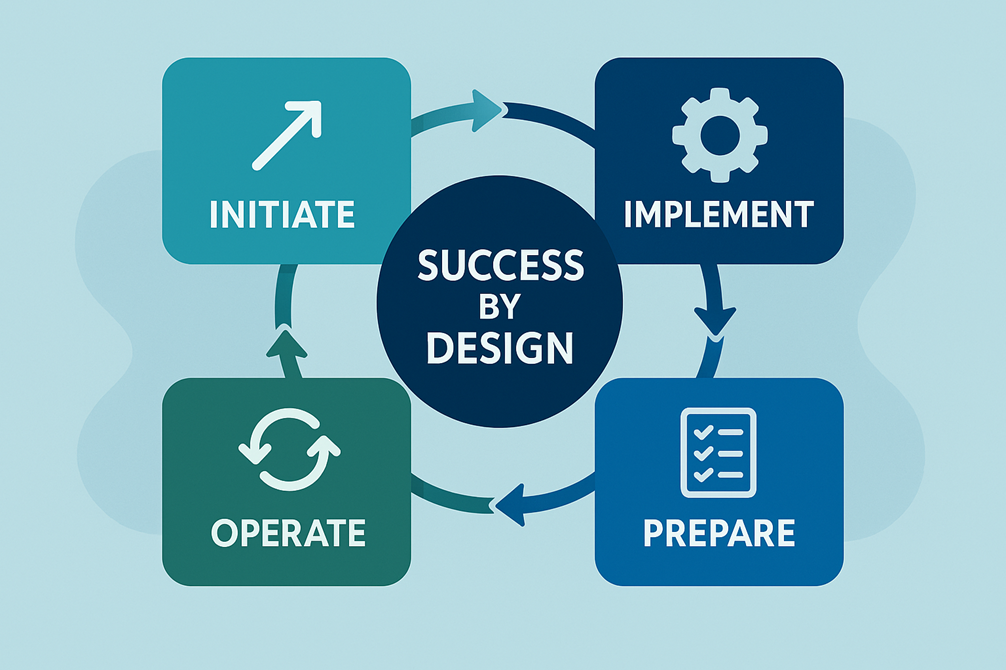
Initiate: Establish the Foundation for Success
The Initiate phase focuses on getting the organisation ready to start the implementation with clarity, alignment, and governance. The goal is to define what success looks like, agree on scope, and ensure all stakeholders share a common understanding of objectives and responsibilities before solution design begins¹.
Key activities in this phase include:
- Requirements Analysis
Identify business needs, pain points, and expected outcomes across finance, operations, and supply chain. - Project Governance
Define project structure, roles, responsibilities, decision-making authority, and escalation paths. - Fit-Gap Analysis
Assess how standard Business Central capabilities meet business requirements and identify gaps requiring configuration or extension. - Project Kick-Off
Establish a shared understanding between the implementation partner and business stakeholders on project scope, delivery approach, timelines, success criteria, governance, and communication structure. - Solution Blueprint Review
Validate the proposed solution design against business objectives and confirm readiness to proceed into build².
The Initiate phase is critical for reducing early-stage risk and avoiding scope misalignment later in the project lifecycle¹.
Implement: Design and Build the Solution
The Implement phase translates business requirements and design decisions into a working Business Central solution.
During this phase, configuration and extensions are built, integrations are designed, data structures are defined, and security and performance considerations are addressed in line with Microsoft recommended practices¹.
Key activities in this phase include:
- Data Modelling
Define master data structures, dimensions, and relationships to support reporting and analytics. - Integration Design
Design and build integrations with external systems such as CRM, eCommerce, or third-party applications. - Solution Performance
Ensure the solution is designed to scale and perform efficiently under real business workloads. - Security Modelling
Define user roles, permissions, and access controls aligned with business and compliance requirements. - Testing Strategy
Establish structured testing approaches, including system testing and integration testing. - Data Migration
Plan and execute the migration of master data and opening balances from legacy systems³.
The objective of the Implement phase is to deliver a robust, secure, and scalable ERP solution that is ready for validation and adoption.
Prepare: Ensure Organisational and Operational Readiness
The Prepare phase ensures that the solution, users, and organisation are fully ready for go-live.
This phase validates that Business Central supports end-to-end business processes and that users are confident performing their daily tasks in the new system¹.
Key activities in this phase include:
- Testing and Acceptance
Conduct User Acceptance Testing (UAT) to validate real-world business scenarios. - Go-Live Planning
Define go-live approach, timing, responsibilities, and contingency planning. - Risk Mitigation Plans
Identify potential go-live risks and define mitigation strategies. - User Readiness
Deliver role-based training to ensure users understand new processes and controls. - Cutover Planning
Plan final data migration, system switch-over, and operational handover activities. - Go-Live Readiness Review
Perform a formal readiness assessment to confirm technical and organisational preparedness¹.
The Prepare phase is designed to minimise disruption and ensure a controlled, confident go-live.
Operate: Drive Adoption and Continuous Improvement
The Operate phase begins after go-live and focuses on stabilisation, adoption, and long-term value realisation.
Microsoft positions this phase as an ongoing cycle rather than a project endpoint, ensuring that Business Central continues to evolve with business needs¹.
Key activities in this phase include:
- Live
Transition the solution into day-to-day operational use. - Solution Health
Monitor system stability, performance, and reliability. - Usage
Track adoption and usage patterns to ensure Business Central is being used effectively. - Maintenance
Apply updates, fixes, and enhancements to keep the system secure and current. - Post Go-Live Review
Review outcomes, identify optimisation opportunities, and plan continuous improvements¹.
The Operate phase ensures that Business Central delivers sustained business value beyond go-live.
Conclusion
A successful Dynamics 365 Business Central implementation requires more than technical execution—it demands a structured, outcome-focused approach. By following Microsoft’s Success by Design framework—Initiate, Implement, Prepare, and Operate—organisations can significantly reduce implementation risk while maximising the return on their ERP investment¹.
With the right methodology, Business Central becomes not just a system of record, but a strategic platform for operational excellence, scalability, and long-term growth.
References:
¹ Microsoft Dynamics 365 Implementation Guide – Overview (Success by Design)
https://learn.microsoft.com/en-us/dynamics365/guidance/implementation-guide/overview
² Success by Design Framework
https://learn.microsoft.com/en-us/dynamics365/guidance/implementation-guide/success-by-design
³ Set up and configure Dynamics 365 Business Central
https://learn.microsoft.com/en-us/dynamics365/business-central/setup